К сожалению, данный материал более не актуален
Данный CSS-стиль позволит убрать знак плюса «+» из пунктов главного меню в социальной сети ВКонтакте или заменить их, допустим, на старые-добрые круглые скобки. Не знаю, зачем вообще так делать, ведь плюсики смотрятся довольно-таки неплохо, однако были жалобы, что многим это не нравится. Для замены плюсиков нужно всего лишь установить небольшой код. 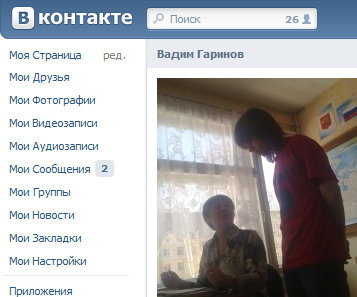
А вот, собственно, и он (если вам не нужны круглые скобки, удалите классы left_count:before и left_count:after, или замените на что-нибудь другое):
Code
.left_count {
background: none !important;
margin-top: 1px !important;
color: #2B587A !important;
vertical-align: 0px !important;
font-size: 11px !important;
padding: 0 !important;
}
.left_plus {
display: none !important;
}
a:hover .left_count_wrap {
margin-top: 0 !important;
margin-bottom: 0 !important;
}
.left_count:before {
content: "(";
font-weight: normal;
}
.left_count:after {
content: ")";
font-weight: normal;
}
background: none !important;
margin-top: 1px !important;
color: #2B587A !important;
vertical-align: 0px !important;
font-size: 11px !important;
padding: 0 !important;
}
.left_plus {
display: none !important;
}
a:hover .left_count_wrap {
margin-top: 0 !important;
margin-bottom: 0 !important;
}
.left_count:before {
content: "(";
font-weight: normal;
}
.left_count:after {
content: ")";
font-weight: normal;
}
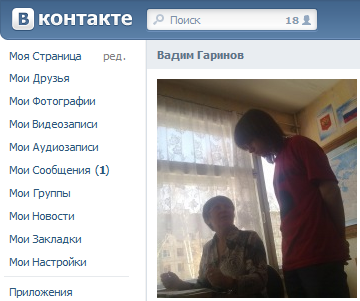
Также вы можете использовать стиль, похожий на тот, что стоял во ВКонтакте немного ранее:
Code
.left_count {
float:right;
color:#456c8a;
font-weight:bold;
background:#E1E7ED !important;
padding:2px 6px 4px 6px !important;
margin-top:-2px !important;
margin-right:2px !important;
margin-bottom:-2px !important;
display:inline-block !important;*
display:inline !important;
-webkit-border-radius:4px !important;
-moz-border-radius:4px !important;
border-radius:4px !important;}
.left_plus {
display: none !important;
}
float:right;
color:#456c8a;
font-weight:bold;
background:#E1E7ED !important;
padding:2px 6px 4px 6px !important;
margin-top:-2px !important;
margin-right:2px !important;
margin-bottom:-2px !important;
display:inline-block !important;*
display:inline !important;
-webkit-border-radius:4px !important;
-moz-border-radius:4px !important;
border-radius:4px !important;}
.left_plus {
display: none !important;
}
Об установке тем или CSS-стилей можно прочитать в специальной статье на этой странице.